
Travel organizer
Keep the whole trip in one place
Treader puts the days on a live map, with the flights, notes, money and documents attached to them.

01
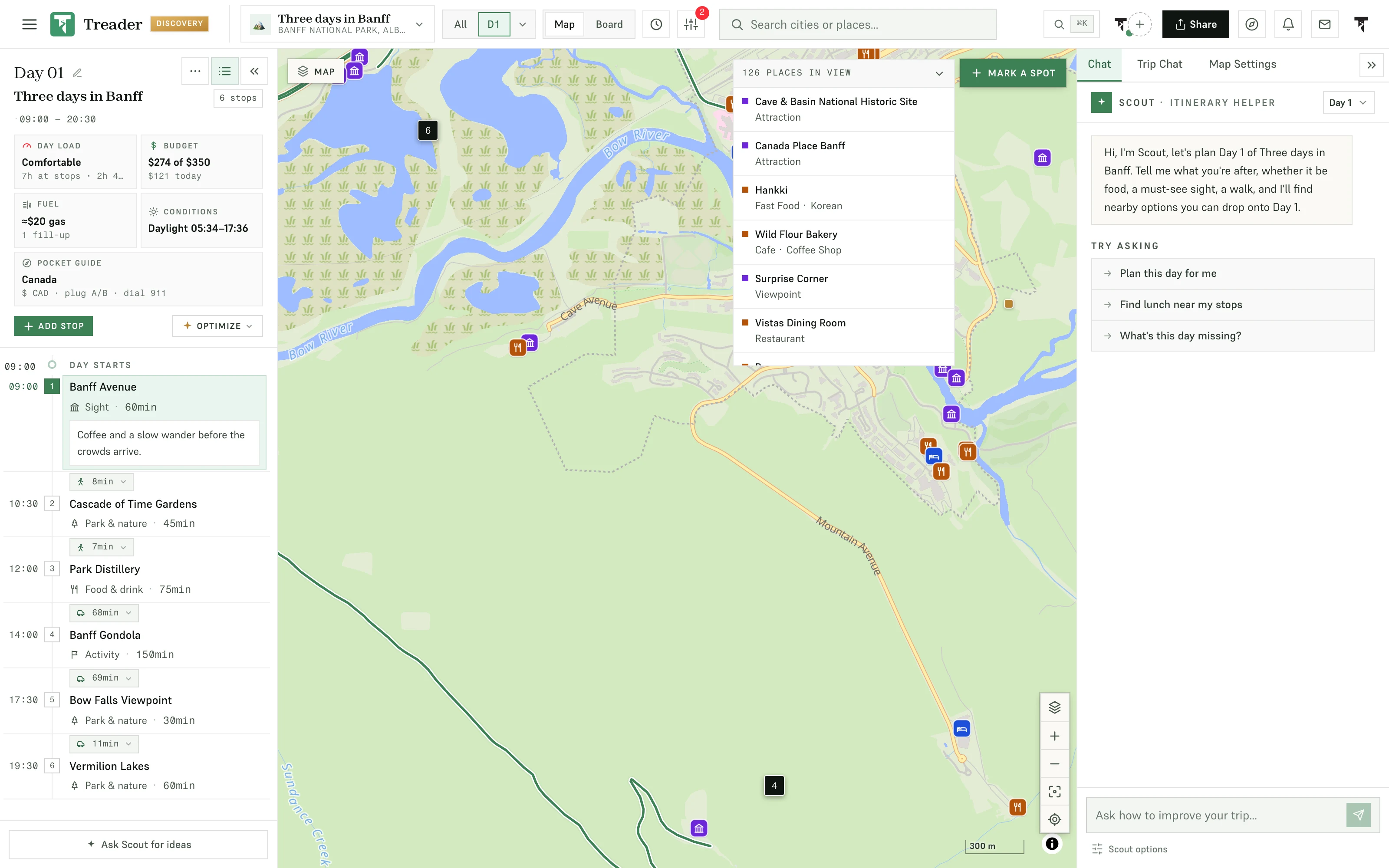
An itinerary on a map
Each day is a set of places with the routes between them. Drag a stop to Tuesday and the drive times, opening hours and daylight update around it. A hike can be part of the plan: import the GPX track and it goes on the day like any other stop, timed from its distance and climb.
02
Everything else stays attached to the trip
Bookings, notes, money, photos and documents sit on the trip, next to its days.
- Paste anything: a link, a blog post or a screenshot sorted into places to tick onto the trip; confirmations and booking PDFs sorted into flights and stays on Discovery
- Trip check: one list of what could still go wrong, with the fix one tap away
- Notes with links, folders and templates, next to the days they describe
- A cost estimate on every plan; a trip budget with per-stop costs, receipts and the running split between companions on Pro ($4.99 a month)
- A packing list generated from your route and the forecast (Pro)
- Live flight status with delay alerts (Pro)
- Everyone’s photos in one album, and a recap page to share when it is over
- Passports and travel documents in a private vault, with entry-rule checks for your destinations (Discovery, $9.99 a month)
03
An AI that reads your plan
Scout works inside the trip. Ask it what Tuesday is missing or where to eat near your last stop, and it answers with places that fit the day, then makes the change for you to keep or undo. It checks hours, weather and routes against your plan. Every plan includes Scout, 15 messages a month free.

04
Use it on the trip
On the trip, Today mode turns the current day into a simple running order: what’s next, how far, what the weather is doing. Subscribe your calendar and every stop stays in step with the plan. It works as an app you add to your home screen, and on Pro the map is saved to the phone so it still draws with no signal.
Ready-made
Start from a trip that already exists
Every stop on a map, day by day. Open one to read it in full, then copy it into your own account and change what you like.
 Long weekend
Grand Teton in 3 days
Grand Teton National Park, Wyoming
3 days · 16 stops
Start from this trip: Grand Teton in 3 days Long weekend
Cabot Trail loop in 4 days
Cape Breton Highlands National Park, Nova Scotia
4 days · 14 stops
Start from this trip: Cabot Trail loop in 4 days A week
Tokyo and Kyoto in 7 days
Tokyo and Kyoto, Japan
7 days · 44 stops
Start from this trip: Tokyo and Kyoto in 7 days Long weekend
Yellowstone in 4 days
Yellowstone National Park, Wyoming
4 days · 17 stops
Start from this trip: Yellowstone in 4 days A week
Iceland Ring Road in 7 days
Iceland
7 days · 46 stops
Start from this trip: Iceland Ring Road in 7 days A week
Rome, Florence and Venice in 7 days
Rome, Florence and Venice, Italy
7 days · 50 stops
Start from this trip: Rome, Florence and Venice in 7 days
Frequently asked questions
What people ask before they plan a first trip. The docs go further.
Read the docsIs Treader free?
The planner is free forever: up to 50 trips of up to 7 days each, the live map, notes, one invited editor per trip and 15 Scout messages a month, no card required. Pro and Discovery add longer trips, budgets, packing, flight tools and the document vault.
What does it replace?
The spreadsheet itinerary, the notes app, the group chat, the folder of booking screenshots and the flight-status app. Paste the screenshots and confirmations in and they become stops and records, so the plan, the money, the documents and the conversation are on the same trip.
Does the AI plan the trip for me?
It can draft a day when you ask, and you decide what stays. Scout sees the trip you’ve built, so its suggestions arrive as stops on your map, on your days, for you to keep, move or undo. It remembers your pace and preferences, so you set them once.
Does it work on my phone?
Yes. Treader is a web app that installs to your home screen like a native one, and the same trip is on your laptop for the evening planning sessions and your phone for the day itself.

Start the trip on a map
Then add the flights, notes, money and documents as you go.
Start free, no card Still deciding? Open a finished trip